Speech Contest
- April 1
- Provo
Speech Contest
Theme: First Amendment
Eligibility: Open to all students K-12
Media: Painting, drawing, mixed media, photography, sculpture
Submission Deadline: March 1
All entries must be the student’s original work. No one else is allowed to alter it in any way.
Works must be submitted as a digital image in JPG format only. PowerPoint format is not accepted. The image should be no smaller than 300 dpi.
No personal or identifying information may appear on the artwork itself, so NO names, grades, teachers’ names or school names on the art.
Divisions: K-3, 4-6, 7-9, 10-12
How-to Submit
Register and upload your video by April 1 by clicking here.
2021 Speech Contest Winner: First Amendment
Abraham Olenslager
2020 Contest Winners: Freedom of Religion
2020 Contest Winner
McKya Anderson
Contest Rules
- April 1 – Deadline for all speeches to be uploaded electronically.
- Theme: First Amendment of the United States Constitution.
- Open to all 9th – 12th grade Utah students.
- You may use visuals or video with your speech.
- Speech must be your own work (family or friends may critique your speech but cannot write it for you).
- Time limit is 5 minutes (penalty if speech is too short or too long).
- The speech should be positive and hopeful, expressing ideas on how to build America and patriotism, while discussing sound principles of freedom.
- Professional dress is requested for presentation.
- Decision of the judges is final.
- Finalist speaks at the Patriotic Service.
Registration and Submission
Register and upload your video by April 1. clicking here.
How to Upload to Youtube
- Go to http://www.youtube.com/
- In the upper right hand corner of the home page click on “sign in”
- If you have a google account you can login with that and go to the next step. If you don’t have a google login then click on “sign up for YouTube” and then fill out the necessary info.
- Once you’re logged in click on the link at the top of the screen that says “upload”
- Click on the button that says “video upload” and then upload your video.
- Make sure to fill out the Title and Description fields appropriately.
- In the privacy section be sure to check the “Public” option.
- Click on the save button at the bottom of the screen
- You may have to wait a while for your video to upload, after your video is done precessing go to your published video page.
- Copy the url link and paste it in the filed on the submission form.
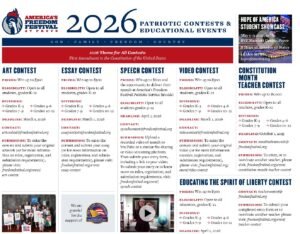
Download The Educational Events Poster
Submission deadline – March 1
2025 Winners
1st Place – Andrew Tanner,
Home School, Provo, UT:
2nd Place – Heber Tanner,
Home School, Provo, UT:
3rd Place – Katie Bell,
Home School, Mapleton, UT:
Honorable Mention – Abigail Morgenstern,
Davis High School:
Honorable Mention – Joy Moore,
Home School, Saratoga Springs, UT:
Honorable Mention – Landon Beeston,
Home School, Spanish Fork, UT:
Honorable Mention – Ramona Andersen,
Home School, Highland, UT:
Download The Educational Events Poster
Submission deadline – March 1
Awards & Prizes
- 1st place - $600,
- 2nd place - $350,
- 3rd place - $300,
- 3 Honorable Mentions - $100
Don't Miss
Flag Retirement Ceremony
June 14
7:00 pm
Provo Veterans Memorial Park
800 E. Center Street, Provo
Private: Presidents Day Movie Night
February 17
6:30 pm
SCERA Center for the Arts
745 S State St, Orem
Event Photos